




Using Webhooks in Manu Online
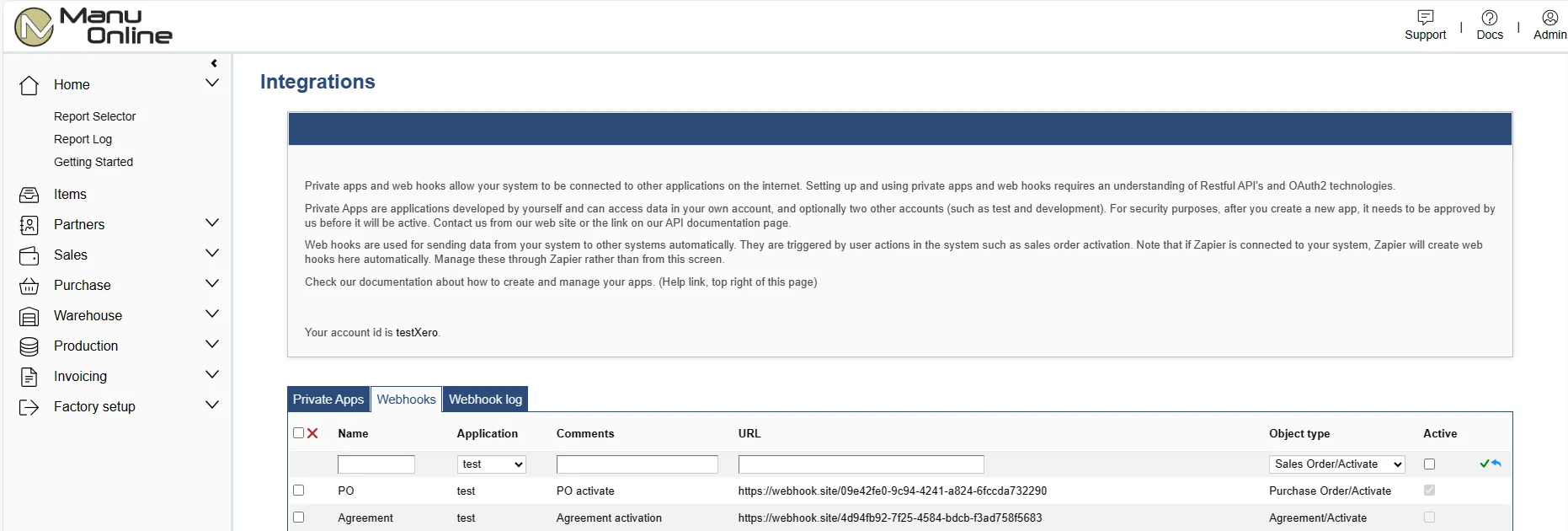
Webhooks are data transfers triggered by an action by a user in Manu Online. They send data out from the system to the address specified. The server on the receiving end is often called the "listener". While it is also possible to "get" data from your Manu Online account by using the API, webhooks have a huge advantage in that if there is a transmission error or business-logic error on the listener, the user will get immediate feedback and can try again.
Webhooks are associated with a private app. This is created using our API tools so the listener can verify that the data is being received from a valid source — i.e. the Manu Online account.
The webhook listener must be coded into your application for this to work. It is strongly
recommended to use an encrypted connection — i.e. an https:// endpoint. The
transmitted data contains a signature for your listener to verify that it is from your Manu
Online account. The signature is based on the first client secret of the associated private
app. The signature is MD5-encrypted data in the header called
Manu-MD5-VerifyCode. It is the listener's responsibility to check that the
signature is correct before accepting the data. See the bottom of this article for sample
code about how to verify the signature.
The data package sent is the same JSON data that an API call will return. A webhook will be tried once. If it fails, an error will be shown to the user. The user can retry the action, or your application can be programmed to get information from the API on a regular basis to check that all are received — for example a nightly call for the list of sales orders that have been created that day.
Note that our Zapier integration will also set up webhooks on your account if you use Zapier. These are not visible here, but the user might see webhook errors — for instance, if your Zapier account has expired.
Webhook creation
To create a webhook, ensure that you have first created a private application. Then go to Admin – Integrations – Web hooks. Give it a name and select the app id, optionally add some descriptive comment, enter a valid URL and select the type of webhook. Finally ensure that the Active checkbox is selected.

The following actions in Manu Online can be used to trigger a webhook.
| Webhook type | Trigger(s) |
|---|---|
| Agreement/Activate | Activating an agreement |
| Item/Save | Saving an item |
| Partner/Save | Saving a partner |
| Picklist/Created | Creating a picklist from a work order |
| Purchase Order/Activate | Activating a purchase order |
| Sales Order/Activate | Activating a sales order |
| Serial Number/Save | Creating a serial number in a work order, saving a serial number record, dispatching a serial-numbered item |
| Sales Invoice | Activating a sales invoice |
| Purchase Invoice | Activating a purchase invoice |
| Sales Dispatch/Activate | Activating sales dispatch |
| Sales Dispatch/Send | Adds a button for sending a message of dispatch under construction when this webhook is created |
| Partner API/Post | Creating a new partner using the API |
| Receipt/Send | Adds a button for sending a message of receipt under construction when this webhook is created |
Logging webhooks
All webhooks are logged. If the webhook listener returns any HTML code other than 200, it will be logged as an error.
The logs can be seen from the Web hooks log tab. By default only errors are shown. Check the box to show successes as well.
Sample code for verifying the signature of a webhook
class Program {
    static void Main(string[] args) {
        var secret = "";   // the value should be your ClientSecret1
        var md5 = "";
        var payload = "";  // replace it with the body of webhook request

        if (md5 == GenerateVerifyCodeWithPayload(secret, payload))
            Console.WriteLine("Signature is correct");
        else
            Console.WriteLine("Invalid Signature");

        Console.ReadKey();
    }

    private static string GenerateVerifyCodeWithPayload(string accountKey, string payload) {
        string source = payload + accountKey;
        return new MD5Encryptor().MD5(source, MD5Encryptor.MD5Type.bytes32);
    }
}

public class MD5Encryptor {
    public enum MD5Type { bytes16 = 0, bytes32 = 1 }

    public string MD5(string strSource, MD5Type type) {
        byte[] dataToHash = (new ASCIIEncoding()).GetBytes(strSource);
        HashAlgorithm algorithm = (HashAlgorithm)CryptoConfig.CreateFromName("MD5");
        byte[] hashvalue = algorithm.ComputeHash(dataToHash);

        var i = 0;
        string rs = "";
        switch (type) {
            case MD5Type.bytes16:
                for (i = 4; i <= 11; i++) {
                    rs += String.Format("{0:X}", hashvalue[i]).PadLeft(2, '0').ToLower();
                }
                break;
            default:
                for (i = 0; i <= 15; i++) {
                    rs += String.Format("{0:X}", hashvalue[i]).PadLeft(2, '0').ToLower();
                }
                break;
        }
        return rs;
    }
}