




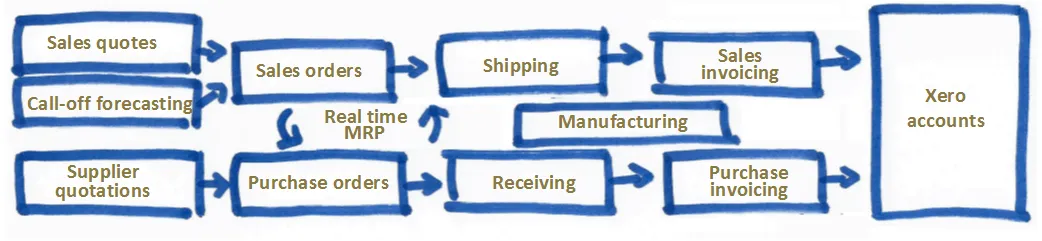
Seamless accountancy data sync
Manu Online supports the popular Xero accounting software package. Now you can build a complete, integrated and powerful ERP manufacturing system together with Xero accounts.
About Xero

Xero is world-leading online accounting software built for small business.
- Get a real-time view of your cashflow. Log in anytime, anywhere on your Mac, PC, tablet or phone — small business accounting that's simple, smart and occasionally magical.
- Run your business on the go. Use the mobile app to reconcile, send invoices, or create expense claims — from anywhere.
- Get paid faster with online invoicing. Send online invoices to your customers and get updated when they're opened.
- Reconcile in seconds. Xero imports and categorises your latest bank transactions — just click ok.
What you can do with Manu Online and Xero
- Import your accounts from Xero to Manu Online. This automatically configures Manu Online so it is ready to export your invoices "pre-booked" to Xero.
- Import your contacts from Xero to Manu Online. If you are creating new leads in a CRM linked to Xero, then you can import them to Manu Online to enter their order data. You can also import all your contacts when you start using Manu Online.
- Import items from Xero to Manu Online. At start-up time you can bulk import items created in Xero. (You can also import using spreadsheets or copy-and-pasting to Manu Online's start-up wizard.)
- Export sales and purchase invoices from Manu Online to Xero. This will include details of the invoices together with customer and supplier data, and the items you are selling or buying. You can choose if your invoices are exported as draft, submitted or approved.
What's it all add up to?
For sales: a complete, integrated automated process from sales quotation to sales order to shipment to invoice to Xero for accounts and accounts receivable.
For purchases: a complete, integrated automated process from planned purchases (calculated from net requirements) to receipt to invoice matching to Xero for accounts and accounts payable.
Enter the data only once at the beginning. The rest of the process is automated — and of course you benefit from Manu Online's manufacturing planning and execution.
For your accountant
Remember that Manu Online is a cloud-based multi-user system, so you can give your accountant or bookkeeper user credentials in Manu Online. They can then control the Manu Online → Xero process according to their own timetable.
Xero to manufacturing in just 10 minutes
Just to see if we could do it: was it possible to get a manufacturing ERP system set up and run through the basic processes in just 10 minutes? Here are the steps:
- Create an account on our cloud servers.
- Log in.
- Import your chart of accounts, items and contacts from Xero.
- Change one item to a product and create a bill of materials for it.
- Sell it to your customer.
- See what needs to be purchased and buy them.
- Receive the purchased items.
- Open the work order and issue the items to it.
- Close the work order — product goes to stock.
- Ship the product to your customer.
- Create the sales invoice for the customer.
- Enter the purchase invoice from the supplier.
- Transfer the invoices across to Xero for processing.